.svg)
Provide Secure Access to External Resources from Kubernetes with the Netmaker Operator

Provide Secure Access to External Resources from Kubernetes with the Netmaker Operator
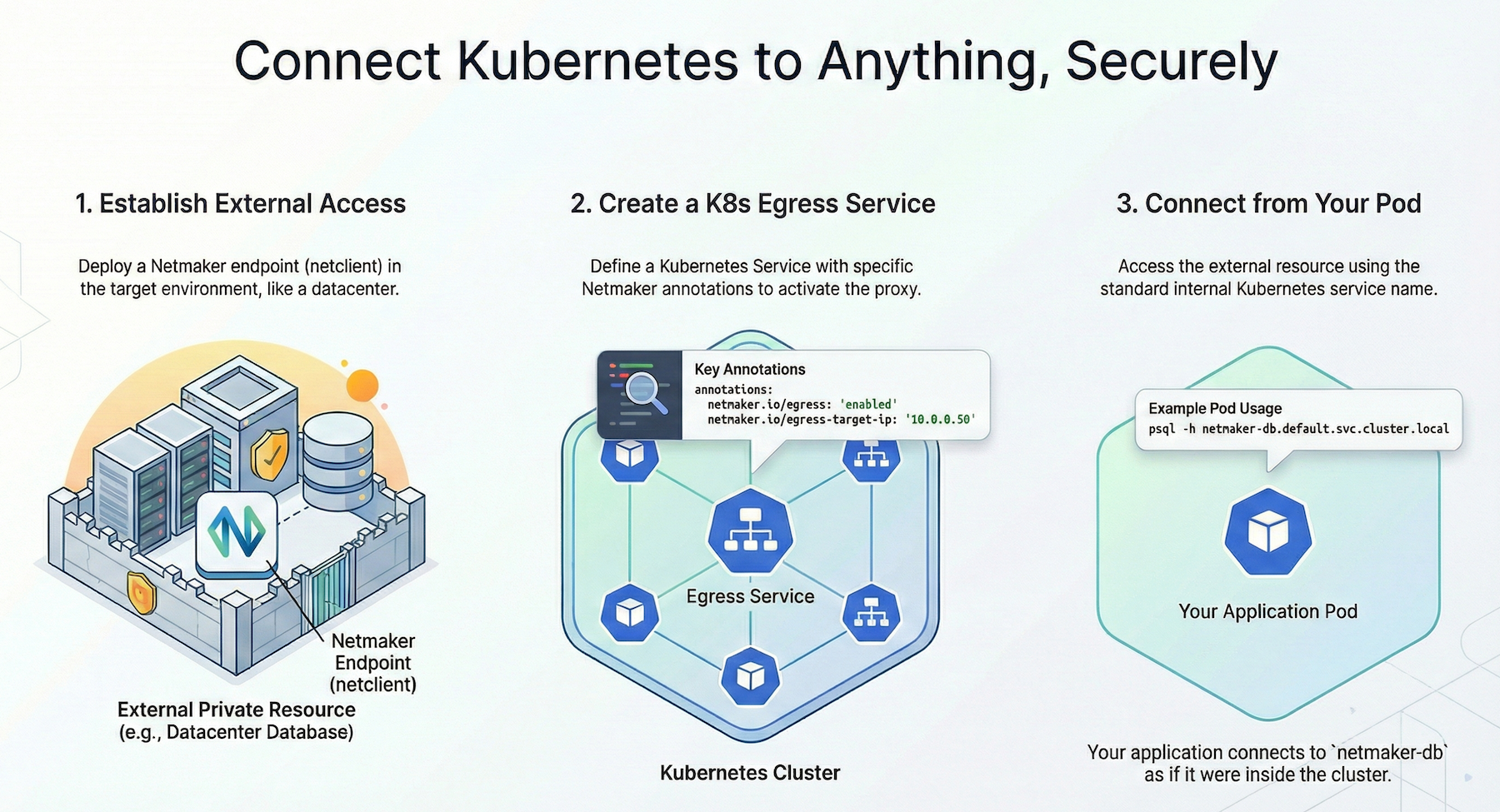
The Netmaker Operator now enables Kubernetes administrators to make external services such as databases and private APIs accessible to cluster workloads over a secure network.
This is done with simple annotations on a standard Service object, allowing Kubernetes applications to access these external services securely using standard Kubernetes Service names.
Establishing access to private resources requires Netmaker, the Netmaker Operator, a Netmaker endpoint in the target environment, and a Service object definition:
- Install or Sign Up to Netmaker
- Install the Netmaker Operator with helm
- Deploy a Netmaker Endpoint in the Target Environment either
- directly on a target device or
- on a local device that will forward traffic to the destination.
- Create a Service object with the Netmaker annotations for Egress
Below, we have an example Service definition with the Netmaker Egress annotations.
apiVersion: v1
kind: Service
metadata:
name: netmaker-db
namespace: default
annotations:
netmaker.io/egress: "enabled"
netmaker.io/egress-target-ip: "10.0.0.50"
spec:
ports:
- name: postgres
port: 5432
targetPort: 5432 # Port on the Netmaker database device
protocol: TCP
type: ClusterIP
As you can see, a few fields is all it takes to make the target service accessible. You just need to enable Egress and define the target IP and Port.
When you create a Kubernetes Service with these annotations, the operator sets up an in-cluster egress proxy pod that will route traffic into the Netmaker network.
- The Netmaker Operator create a proxy pod with a netclient sidecar
- The proxy listens on Kubernetes Service port
- The proxy forwards traffic to the defined endpoint in the Netmaker network via WireGuard.
Your cluster workloads can now access the external service over Netmaker using the Kubernetes Service name, without needing to know the underlying Netmaker IP or DNS.
Example: Expose a Database
This example assumes you have deployed a “netclient” via Netmaker on a device outside the cluster which has a database. Alternatively, you could forward traffic to a local endpoint via Netmaker (e.g. 192.168.1.50) via the netclient, without deploying the netclient directly on the device / service.
Once this is done, on Kubernetes, you simply create a Kubernetes Service with specific annotations to enable the Egress Proxy.
apiVersion: v1
kind: Service
metadata:
name: netmaker-db
namespace: default
annotations:
netmaker.io/egress: "enabled"
netmaker.io/egress-target-ip: "10.0.0.50"
spec:
ports:
- name: postgres
port: 5432
targetPort: 5432 # Port on the Netmaker database device
protocol: TCP
type: ClusterIP
Usage in Pod:
psql -h netmaker-db.default.svc.cluster.local -U postgres





.svg)